
Free Google SERP Checker
Check the live Google results for any keyword, free, with no signup and no daily limit wall. Enter a keyword, get the real top results: titles, URLs, and which SERP features (AI Overview, snippet, People Also Ask) are absorbing clicks. That's the whole tool. No email gate, no "3 free checks then pay."
Neutral, repeatable results for the exact market you select. Identical recent checks are served from cache.
Want the rest of the toolkit? The free SEO/LLM Skills Pack for Claude gives you 11 specialist skills for technical audits, schema generation, content briefs, and AI visibility scoring, installed in under 5 minutes.
What is a SERP checker?
A SERP checker is a tool that shows you the real Google search engine results page (SERP) for a keyword, the actual top-ranking pages in order, exactly as Google returns them for a chosen location, language, and device. Instead of the personalized results you see when you search while logged in, it pulls a clean, neutral snapshot of the live rankings.
This checker returns the top 100 organic results for any query, along with the SERP features present on the page: featured snippets, People Also Ask, AI Overviews, related searches, and more. That way you can see the full competitive picture, not just the blue links. To see which of those answer blocks a query triggers and which sources Google cites inside them, run the same keyword through the AI Overview and SERP feature checker.
Why another SERP checker?
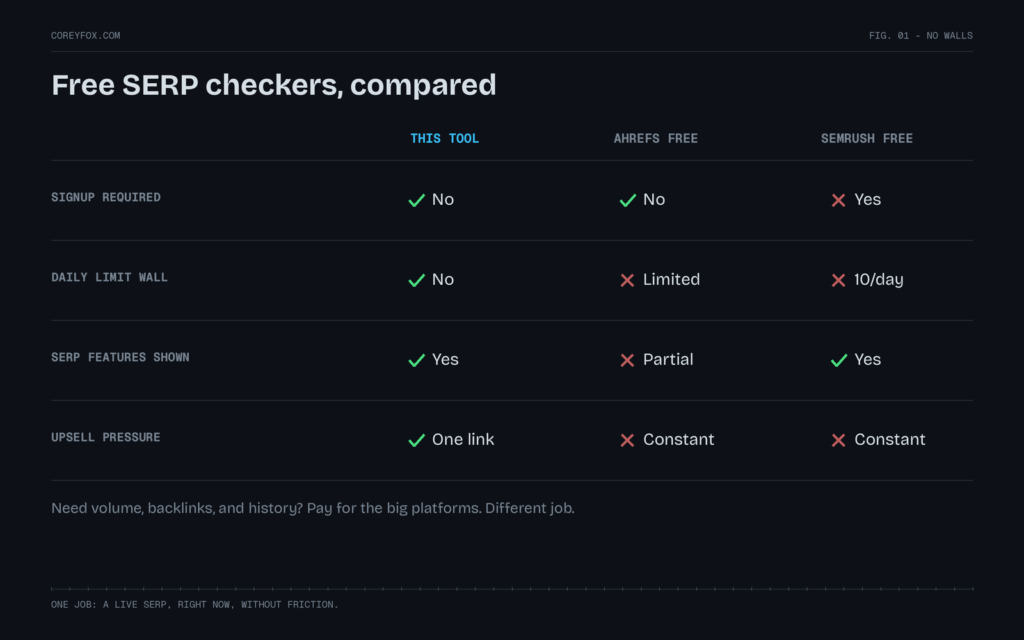
Because the free ones from the big platforms are lead magnets first, tools second. They work, until they wall you.
| This tool | Ahrefs free checker | Semrush free tools | |
|---|---|---|---|
| Signup required | No | No | Yes, account wall |
| Daily limit | No hard wall | Limited checks | 10 requests/day tier |
| Shows SERP features | Yes | Partial | Yes |
| Upsell pressure | A link to my free tools | Constant | Constant |
| Live results | Yes | Yes | Yes |
To be fair to both: if you need volume data, backlinks, and rank tracking history, pay for Ahrefs or Semrush; that’s a different job, and I use Ahrefs daily for it. This tool does one job, checking a live SERP right now, without friction.
How to use the SERP checker
- Enter your keyword: the exact phrase you want to check (for example, best running shoes).
- Pick a location: the country you’re targeting, such as the US or UK. If you serve a local market, this matters most.
- Choose language and device: match how your real audience searches, and check mobile separately from desktop.
- Click “Check SERP”: the tool fetches the live top 100 results.
- Read the results and export: scan positions, domains, and SERP-feature tags, then download the full list as a CSV if you want to track it over time.
How to check your SERP position for a keyword
If what you really want to know is “where does my site rank for this keyword?”, here’s the fastest way to find it with this tool:
- Run the check for your keyword with the country and device your customers actually use.
- Search the results for your domain. Use Ctrl+F (Cmd+F on Mac) and type your domain name. The position number next to it is your live ranking for that market.
- For a cleaner record, export the CSV and filter the URL column by your domain. That also shows you if more than one of your pages ranks for the same keyword, which usually means they are competing with each other.
- Check mobile and desktop separately. It’s common to rank a few positions apart on each.
If your domain isn’t anywhere in the top 100, you aren’t ranking in a meaningful position for that keyword in that market yet. And if the position here differs from the “average position” in Google Search Console, that’s normal: Search Console averages every impression across locations, devices, and days, while this is a single live snapshot.
How to track SERP positions for free
This tool isn’t a rank tracker, but you can build a simple free tracking routine with it:
- Pick 5 to 10 keywords that matter most to your business.
- Check each one on the same day every week, with the same country and device.
- Export the CSV and paste your position into a spreadsheet with the date.
- Note which competitors moved above or below you, not just your own number.
Once you’re tracking more than about 10 keywords, or you need daily history, you’ve outgrown the manual approach. My rank tracking software breakdown covers the paid options worth considering.
What to actually look for in a SERP
Reading a SERP is the skill; the checker is just the window. Three things to check every time:
- The winning format. If the top 3 are all listicles and your page is a service page, format mismatch is your problem before content quality is.
- The features above position 1. An AI Overview or featured snippet above the organic results is absorbing clicks before anyone reaches you. If it’s there, ranking #1 isn’t the whole game anymore; being the cited source is. That’s AEO.
- Who’s actually ranking. Five DR 80+ domains in the top 5 tells you the keyword’s real difficulty better than any difficulty score.
Why you can’t just Google it to check your ranking
Here’s the mistake I see people make constantly: they open a browser, search their keyword, scroll until they spot their site, and call that their “ranking.” It isn’t. The results in your own browser are personalized to you, so what you see is almost never what a first-time visitor in your target market sees.
A handful of factors quietly reshape every search:
- Location: results differ by country, and often by city. A query in London and the same query in New York return different pages.
- Device: mobile and desktop SERPs are ranked and laid out differently, and mobile is what most of your audience uses.
- Personalization and history: your past clicks, visits, and logged-in Google account nudge results toward sites you already engage with.
- Language and region settings: these change both the pages shown and the SERP features that appear.
- Time: rankings shift continuously, and a position you hold today can move tomorrow.
A SERP checker strips all of that out. It requests a neutral, unpersonalized result set for the exact location, language, and device you specify, so the ranking you see is repeatable and comparable. That is the whole point when you’re tracking SEO progress or sizing up competitors.
How to read your SERP results
- Position: the absolute rank of each result in the organic listing (1 is the top).
- Domain and URL: which page ranks, so you can see whether it’s a homepage, blog post, product page, or category. That’s a strong hint at what intent Google is rewarding.
- SERP-feature tags: chips showing which features are present (featured snippet, People Also Ask, AI Overview, and so on). These tell you how much of the page is “answer” real estate versus classic links.
Read the top ten together, not one result at a time. The pattern (the page types, the content format, the features Google chose to show) is the brief for what you’d need to publish to compete. Once you know the pattern, you can score your own page’s citability against the criteria AI engines use when they pick which sources to cite.
Run a Shopify store and your product listings show up without review stars or prices while competitors’ do? The usual cause is conflicting structured data, where the theme and a review app both describe the same product. The free Shopify Schema Conflict Checker shows whether that’s happening and which app is responsible.
SERP checker vs. rank tracker: what’s the difference?
They solve related but different problems, and it’s worth being clear about which you need:
- A SERP checker (this tool) is a point-in-time snapshot. You run it on demand to see the live results for a keyword right now, which is ideal for spot-checks, competitor research, and validating a suspected ranking change.
- A rank tracker monitors your positions for a set list of keywords automatically over time, charting movement day to day. Use one when you need ongoing monitoring and historical trend lines.
In practice, most SEOs use a SERP checker to investigate and a rank tracker to monitor. Start here to see what’s actually happening, then move proven keywords into a tracker. And if a keyword you rank for has lost clicks without losing position, that’s usually an AI Overview intercepting the click before it reaches you; the AI Overviews revenue leak diagnostic reads your Search Console data and puts an annual dollar figure on exactly that pattern.
Where the data comes from
These results come from live Google SERP data via the DataForSEO API, not scraped from your browser session. That’s what makes them neutral and repeatable: the same keyword, location, language, and device will return a comparable result set no matter who runs it. Recent identical queries are cached briefly so the tool stays fast and responsive, and no login or personal data is required to use it.
One more thing worth knowing: organic position is only the demand-capture half of visibility now. The other half is whether AI engines cite you when they answer questions in your category. If that layer is new to you, start with what AEO is and how it works, then check what AI assistants currently say about your brand.
SERP checker FAQ
Is this SERP checker free?
Yes. You can check the live top 100 Google results for any keyword for free, with no account or sign-up required. Fair-use limits apply to keep the tool fast for everyone.
How do I check my SERP ranking?
Run the check for your keyword, then search the results for your domain with Ctrl+F (Cmd+F on Mac). The position number beside your URL is your live ranking for that country and device. For a record you can compare later, export the CSV and filter by your domain.
How accurate is the SERP checker?
It reflects live Google results pulled through the DataForSEO API for the exact location, language, and device you select. Because it requests neutral, unpersonalized results, it’s more representative of what a typical searcher sees than the personalized results in your own browser.
Why are the results different from what I see when I Google it myself?
Your own searches are personalized by your location, device, language, search history, and logged-in Google account. This tool removes that personalization and returns a clean result set for the specific parameters you choose, so the ranking is repeatable and comparable.
Does it show AI Overviews?
It flags when SERP features, including AI Overviews, are present for the query. To check whether YOUR brand appears inside AI answers, use the AI Citation Checker, which is built for exactly that.
Can I check rankings for a specific country?
Yes. Choose your target country, such as the US or UK, from the location selector before running the check, and pick the matching language. This is essential if you’re doing SEO for a market different from where you’re physically located.
Does it check mobile and desktop separately?
Yes. Use the device selector to switch between desktop and mobile. The two SERPs are ranked and displayed differently, so it’s worth checking both, especially since most searches now happen on mobile.
Does it check Yahoo or Bing results?
No. It checks Google only, which is where the large majority of search traffic comes from. Yahoo’s results are largely powered by Bing, so if those engines matter to you, check them directly.
How many results does the SERP checker show?
It returns the top 100 organic results, plus tags for the SERP features present on the page, such as featured snippets, People Also Ask, and AI Overviews. To see who Google cites inside an AI Overview for your keyword, use the AI Overview and SERP feature checker.
Can I export the SERP results?
Yes. You can download the full result list as a CSV file to save a snapshot, compare it against a later check, or drop it into your own reporting.
Does this tool track my rankings over time?
No. It’s a live, on-demand snapshot rather than an ongoing tracker. You can track a small keyword set for free by running weekly checks and logging the CSV exports, as described above. For continuous monitoring with historical trend charts, use a dedicated rank tracker.
Checking SERPs because your traffic dropped while rankings held? That signature usually means AI answers are absorbing your clicks. The free AI visibility audit puts a dollar figure on it in 8 minutes.